Introduction
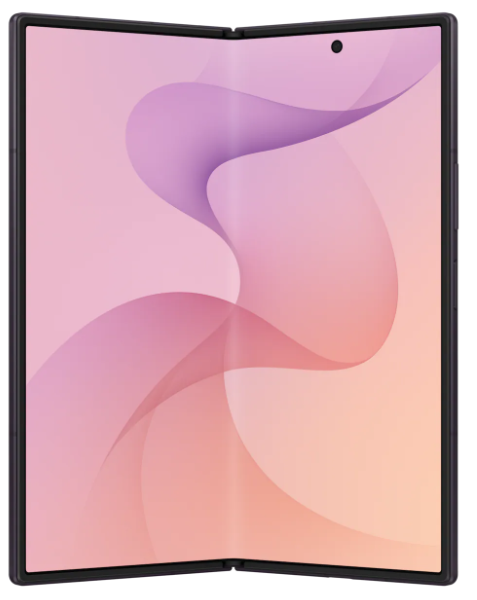
When the Samsung Galaxy Z-Fold, released in September 2019, came on the market, I was intrigued. But even before it reached store shelves, the press quickly found major issues, and while it found buyers, it was not a great start to a new paradigm in smart phones.
It was also expensive at approximately $2000 US!
Samsung quickly iterated on the design, and version 2, which followed in September 2020, was a much more solid design. It was just as expensive, but fixed quite a few of the flaws of the original.
Eight years later we have the Galaxy Z-Fold 8 ($1900 US) and Z-Fold 8 Ultra ($2100 US). These are just as or even more expensive, but much more mature.
I finally decided to take the plunge: I bought the Galaxy Z-Fold 8 Ultra. I chose the Ultra over the base Fold because I wanted as slim a fold as I could find, one which would slip into my pocket easily.
The Bad
I only have a single complaint and that is the power button, which is used to wake the phone, and also has the fingerprint sensor, is tiny and hard to find.This is especially true when the phone is closed and I’m in a hurry.

It’s not an impossible situation, of course, and I’m getting used to it, but it’s odd Samsung decided to use such a small button for such an important task. This button is not only used to power on the phone, but also to wake it, sign in, and when double-clicked, to open the camera application. If you long press it, it brings up the digital assistant (Gemini AI), and when used in combination with the volume down button, it takes a screenshot.
The Good
Battery Life
Phone battery life is one of those things that makes no sense to me. The last two I had, both Pixel phones, lasted two entire days on a single charge when I first got them. Within a couple of months, that changed to a day plus.
So far the battery life of the Z-Fold 8 Ultra has been excellent. It typically exceeds two entire days. Note that this is with the phone mostly closed.

Why is it mostly closed?
Multitasking
When open, the Z-Fold 8 Ultra is exceptional at multitasking. If I need to use two apps simultaneously, it handles the scenario effortlessly. Typically this is an app that requires multi-factor authentication and my MFA app. I open them side-by-side or one on top, the other on the bottom.
I do this often, but not constantly, and part of the reason is because the phone is only so big. It’s roughly the size of an iPad Mini, which is 195.4 x 134.8 mm or 7.69 x 5.31 inches. The Z-Fold 8 Ultra is 158.4 x 143.2 mm or 6.24 x 5.64 inches.
This is almost twice as big as a typical large phone screen, but tiny compared to a 13-inch laptop. I personally find that size of laptop screen too small to tile two large windows side-by-side. For example, if I want to open a banking app and Excel on that size of laptop, I switch between them instead. The screen size isn’t big enough in my opinion to handle that particular scenario.
Other Reasons to Open Up
There are other reasons to open the phone, like to watch a video, something I don’t do very often. I prefer that on a much larger screen, like on a computer or TV. Reading is another good reason, or viewing and editing photos. Taking notes. And there are a myriad other reasons to unfold the Z-Fold.
The Crease
When I open the Z-Fold 8 Ultra and look for the crease, it’s there. I can see it if I strain my eyes enough, but only in bright light.
Is it a big deal? No. Does it matter to me? Not at all.
Fact is, the crease is meaningless unless for some reason you focus on it and it bothers you.
The Camera
I used to have unrealistic expectations for the cameras built into my phones. I bought a previous Samsung Galaxy phone because it had a 10X optical zoom lens, but I didn’t use the zoom that much. Fact is, I mostly take pictures of my dogs, clouds, flowers, and people.
I don’t need a long zoom and the Z-Fold 8 Ultra so far has taken photos every bit as good or better than any previous phone I’ve owned, including Pixels made by Google.





Conclusions
For me, a phone is all about the ability to use apps that help me manage my life. That includes being able to keep in touch with loved ones, keep an eye on my job, take and edit photos, take notes, manage my finances, shop, and use AI for questions.
How does the Z-Fold 8 Ultra handle these tasks? It handles them well, and it excels in many ways, because when I open it, I have a larger canvas to work with. The extra real estate makes many of these tasks simpler because it expands the work area, and provides me with enough room to run two apps side-by-side.
It’s an expensive phone,and I couldn’t really afford it, but I wanted to experience it for myself. I’ve owned the Microsoft Surface Duo before, and it had so much potential, but was wasted by an implementation that failed to capitalize on the two screens.
The Samsung Z-Fold 8 Ultra doesn’t do this. It does have some features, like Flex Mode, which seem a little half-baked, but over time, as foldables become mainstream, I think we’ll see these and other features make them unique compared to non-foldables.
Leave a Reply